HiSummary
HiSummary – AI Video Summary & Chat
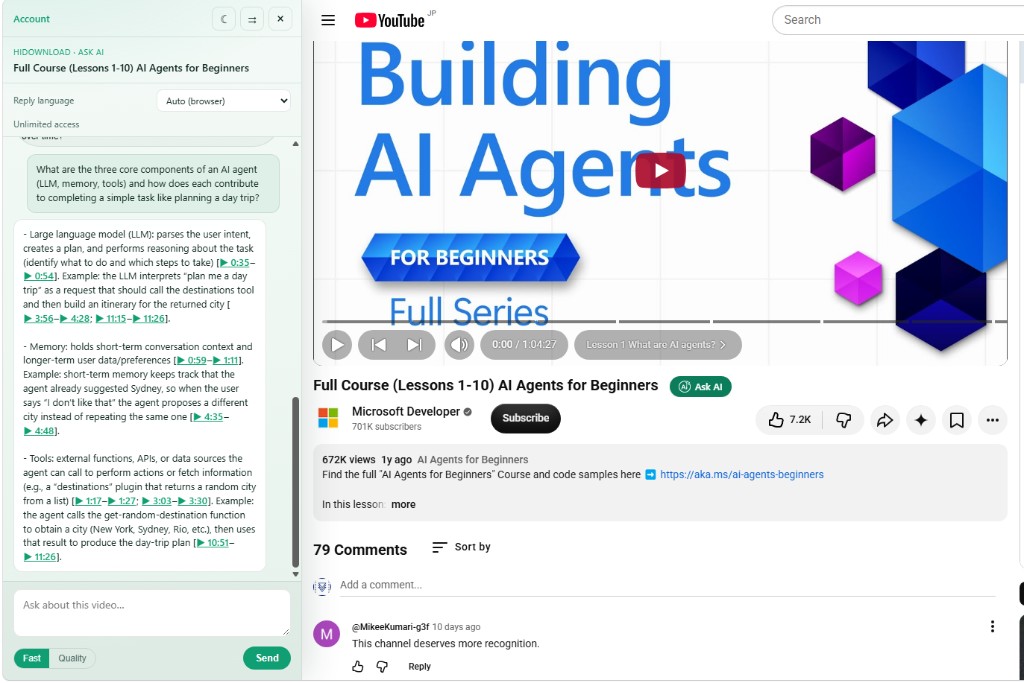
Add HiSummary to YouTube and TED Talks. Open a watch or talk page, click Ask AI next to the title, and summarize or chat about the video in a sidebar — with clickable timestamps that jump the player.

How to install
- Download the ZIP and extract it to a folder you keep (for example Documents\HiSummary-Extension).
- Open chrome://extensions (or edge://extensions) and turn on Developer mode.
- Click Load unpacked and select the extracted folder that contains manifest.json.
- Sign in at hidownload.net, then open a YouTube video or TED Talk and click Ask AI next to the title.
Requirements
Chrome or Microsoft Edge (Chromium). A HiDownload account is required to use AI chat (same free daily quota / tokens as YouTube Chat).
Latest updates
HiSummary v1.0.4 — TED Talk support
TED Talk support — Open any talk on ted.com, click Ask AI next to the title, and chat in a sidebar just like on YouTube.
Layout push — On TED pages the sidebar resizes the page instead of covering the talk.
Timestamp seek — Click timestamps in AI answers to jump the TED player to that moment.
Reload the unpacked extension after updating so Chrome picks up version 1.0.4.
Frequently Asked Questions
What browsers are supported?
Chrome and Edge (Chromium-based). Other Chromium browsers that can load unpacked MV3 extensions may also work.
Does it support TED Talks?
Yes. On ted.com talk pages, Ask AI appears next to the title. Open the sidebar to summarize the talk, ask questions, and click timestamps to seek the TED player — same AI quota as YouTube Chat.
Is the extension free?
Yes, downloading and installing the extension is free. AI usage follows the same YouTube Chat quota: after sign-in, free daily limits apply; buy AI tokens or a subscription for more.
Why do I need captions?
Ask AI reads YouTube captions (CC) and TED Talk transcripts. Hardcoded burned-in subtitles cannot be used. If a video has no captions, use the HiDownload desktop client to generate them with AI.
Do I need to stay signed in?
Sign in on www.hidownload.net in the same browser profile. The extension uses that session cookie when calling the YouTube Chat API.
Will Chrome Web Store listing be available?
The ZIP / Load unpacked build is available now. A store listing may follow later; this page will be updated when it is ready.
Can I resize or move the sidebar?
Yes. Drag the left edge to resize, drag the header (or use the dock button) to switch left/right, and use the sun/moon button for light or dark theme. On TED pages the sidebar pushes the layout instead of covering the talk.